
New Generative TCP Design — drop a work area, get the plan Every traffic deliverable.
Every traffic deliverable.
One AI studio.
Traffic impact studies, EIR transportation analysis, safety studies, traffic control plans and drafting — LaneMarker AI Studio takes you from a satellite photo to a submittal-ready deliverable, with every number cited.
✦ Generative design Tracing road
It asks TA-21 · near side of the intersection. Keep the right turn open past the work area?
Typical applicationTA-21 · 45 mph
Merging taperL = W·S = 540 ft
Buffer space360 ft
Sign spacing A·B·C350 ft
Devices22 cones + board
Generative TCP design.
- Drop a work area — the plan designs itself on the real lanes
- Taper, buffer and sign spacing cited to MUTCD 11th + state rules
- Plan sheets to PDF and DXF
PM peak · delay (s/veh) and LOSSample data
| Intersection | No-build | Build | Mitigated |
|---|---|---|---|
| Main St & Oak AveSignal | D41.2 | E63.8 | C29.5 |
| Main St & Site DwyTWSC | — | F58.1 | B14.2 |
| Oak Ave & 5th StAWSC | B12.6 | C18.9 | C17.4 |
| Pine Rd & Oak AveRoundabout | A8.1 | B11.3 | B11.3 |
Mitigation: add NB right-turn lane, retime PM plan · LOS E → C
TIAs from scoping to submittal.
- Counts, trips, distribution and HCM on one live network
- Mitigation only where the project causes the problem
- Written to your agency’s outline — Word and PDF
PM peak LOS · EIR scenariosSample data
| Intersection | Existing | Exist. + Project | Cumulative | Cum. + Project |
|---|---|---|---|---|
| Main St & Oak Ave | C | D | D | E |
| Oak Ave & 5th St | B | B | C | C |
| Main St & Site Dwy | — | C | — | D |
| Pine Rd & Oak Ave | A | B | B | B |
14cumulative projects found within 1.5 mi
1intersection drops to LOS E with the project — mitigation tested
The transportation analysis behind your EIR.
- Existing, project, no-project and cumulative scenarios
- Surrounding projects found, generated and distributed
- Tables and a section draft for CEQA and NEPA documents
Oak Ave corridor · 5-year crash historySample data
148crashes
11fatal + serious
34%rear-end
2.1×observed / predicted
Leading pedestrian intervalCMF 0.87 · ped crashes
Protected left-turn phasingCMF 0.84 · angle crashes
Retroreflective backplatesCMF 0.85 · all crashes
Safety studies that start with the crashes.
- Crash records snapped to the road you are studying
- HSM predictive analysis and CMF countermeasures
- Memos ready for SS4A and safety action plans
AerialAsphaltLineworkPDF · DXF
Satellite photo to plan sheet.
- Curbs, lane lines, crosswalks and pockets traced from imagery
- Drafting agents close gaps and square every line
- Aerial, asphalt or linework sheets — PDF and DXF
- HCM
- MUTCD 11th Edition
- California MUTCD
- Highway Safety Manual
- CEQA & NEPA
- SS4A
Generative TCP Design Drop a work area.
Drop a work area.
The plan designs itself.
LaneMarker reads the real road — lanes, speed, intersections, driveways — and designs the traffic control plan around your work: taper, buffer, arrow board, sign ladder and every device, cited to MUTCD 11th Edition and your state’s rules. Move it, and everything moves with it. Try it:
Typical applicationRight lane closure
Merging taperL = 540 ftW × S = 12 × 45
Buffer space360 ftby posted speed
Sign spacing A · B · C350 fturban, high speed
Devices—re-designed in —
It asks: the closure ends at the near side of the intersection (TA-21). Keep the right turn open, or close it?
Simplified teaching model of MUTCD 11th Edition Part 6. In the studio the plan is designed on the real traced road, with your state’s rules.
- 01DraftRoad traced from imagery
- 02DesignPlan generated on the real lanes
- 03EngineerRules cited · questions asked
- 04EditBy hand, by chat, by agent
- 05SheetPlan set to PDF and DXF
The plan set
Sixty seconds ago, this plan set was a satellite photo.
- Intersections, pedestrians and bicycle lanes handled per MUTCD 11th Edition
- California MUTCD and Caltrans standard plans built in; more states as rule packs
- Stops and asks at real decisions — it never invents your facts
- Aerial, asphalt or linework sheets with title block, match lines and sign legend
- Export to PDF, or DXF straight into your CAD
One studio
Studies, plans and drawings. On one live map.
Every module shares the same network, scenarios and volumes — change a lane once and every figure, table, sheet and report follows.
Studies
The reports agencies ask for.Plans & design
Drawings built on the real road.Analysis
The engines underneath.Hoursfrom scoping to first LOS results, not weeks
Secondsto redesign a traffic control plan when the closure moves
12studio modules — studies, plans, drafting, analysis
1 mapnetwork, volumes, plans and reports stay in sync
AI Build
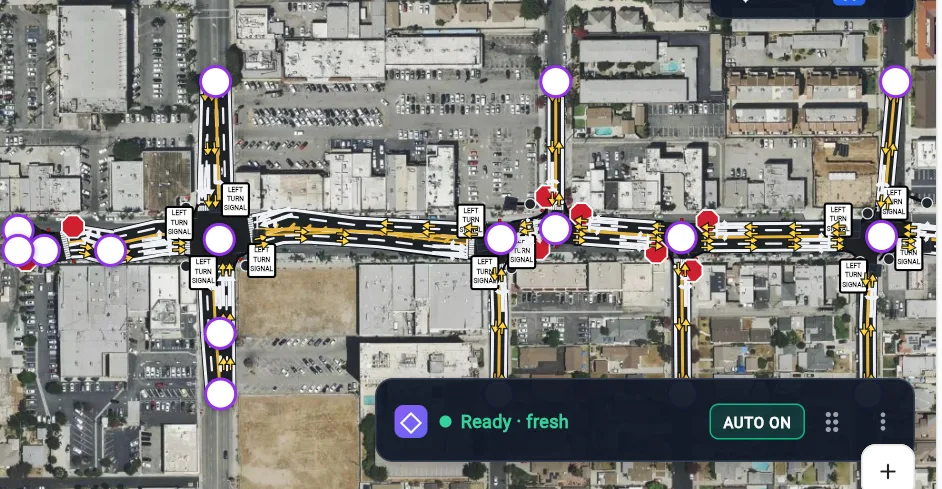
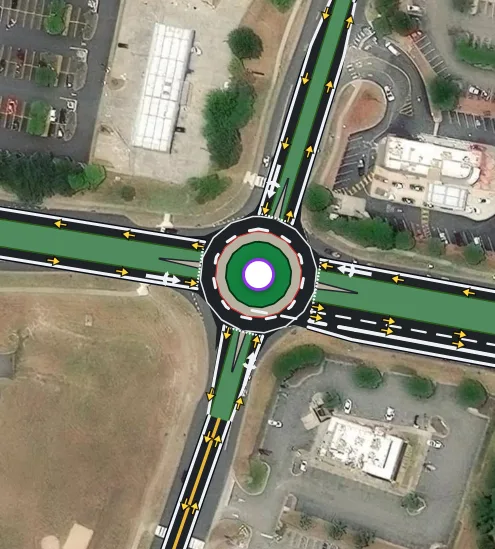
Draw a box. Get the real road network.
Lanes, turn pockets, medians, driveways, signals, stop control and roundabouts — read from the imagery and ready for analysis in minutes, not an afternoon of clicking.
- Each approach read separately — dual lefts, right-turn bays, storage
- Checked over the satellite view so you can verify at a glance
- Fix anything by hand, by chat, or by boxing a mistake for the agent
Trip generation & distribution
Every percentage, justified — direction by direction.
Land uses become AM and PM trips, then flow through the network intersection by intersection. The agent explains each route, and the movement table stays fully editable.
- Pass-by and internal capture for mixed-use sites
- Cumulative developments distributed the same way as your site
- Import an agency distribution or shift trips between routes
PM peak · 61 trips in, 38 out · every route explained and editable
Sample data Agents & chat
Ask like you’d ask a senior engineer.
LaneMarker AI runs the right agents, questions assumptions, explains its reasoning and edits any output with you. When your process is unique, describe it once in Workflow Studio and it becomes your own agent.
- Dozens of agents — volumes, LOS, mitigation, safety, work zones, figures
- Reasoning and sources shown for every result
- Team workflows shared across your company workspace
Add a 120-unit apartment on the NE corner and tell me what changes at Main & Oak.
LaneMarker AIAdded 120 units (multifamily, mid-rise). That’s 49 AM and 61 PM trips. I routed 55% north on Main based on the employment centres. Main & Oak PM goes from LOS D (41 s) to E (63 s) — the NB right turn is the critical movement. Want me to test a right-turn lane?
Yes, and draft the memo.
LaneMarker AI Running HCM · drafting memo
Product tour
Two minutes. The whole studio.
Network on the map, the trip distribution agent reasoning live, the agent catalog, Workflow Studio and the report.
Engineer in the loop
AI that works like a careful engineer.
Fast is only useful if it’s right. LaneMarker is built to be checked.
Cites the rule
Every taper, spacing and LOS result points to the standard and inputs behind it.
Asks, doesn’t guess
When a decision needs judgement, the agent stops and asks you instead of inventing facts.
Everything editable
Change any lane, volume, device or sentence. Results update downstream.
Your data stays yours
Encrypted, role-based workspaces. We never sell your data.
Who it’s for
Built with the people who do the work.
Traffic engineering consultants
Most of a traffic study’s budget goes to coding networks, balancing volumes, re-keying timing and formatting figures.
See howCities, counties & DOTs
Agency engineers review stacks of submittals while running their own safety and corridor programs.
See howDevelopers & site planners
Traffic mitigation can make or break a project’s budget and schedule.
See howContractors & traffic control
Every closure needs a plan, and every plan needs the right typical application, spacing and devices.
See how Also from EntentAI
LaneMarker PlanCheck — AI plan review.
Upload a plan set. PlanCheck reviews every sheet against MUTCD and your local standards and returns a redline report where every comment cites the clause, sheet and standard it came from.
- Pre-built MUTCD engine plus your local supplement
- Train custom review engines on your own approved plans
- Cost estimate, spec sheet and consistency agents
TCP-03 · LANE CLOSURE · STA 12+40 – 18+10
High
Taper too short for 45 mph540 ft required, 320 ft shown — MUTCD Part 6 taper length
Med
Advance sign spacingW20-1 at 250 ft; 350 ft required on this road class
Low
Ped route not shownLocal supplement §4.2 requires sidewalk detour detail
FAQ
Frequently asked questions
What is LaneMarker AI Studio?
LaneMarker AI Studio is one AI studio for every traffic deliverable: traffic impact studies, EIR transportation analysis, safety studies, speed studies, traffic control plans, and design and drafting from aerial imagery. It all runs in the browser on one live map, with agents you can click or simply ask.
What is Generative TCP Design?
You draw the work area; LaneMarker designs the traffic control plan. It reads the real road — lanes, speed, intersections, driveways — and places the taper, buffer, arrow board, signs and devices per MUTCD 11th Edition and your state’s rules. Move the closure and the whole plan re-flows in seconds, then export plan sheets to PDF or DXF.
How is LaneMarker AI Studio different from LaneMarker PlanCheck?
AI Studio is where you create studies, plans and drawings. PlanCheck reviews plans — yours or an applicant’s — against MUTCD and your local standards, sheet by sheet, and produces a cited redline report. Many teams use both.
Who is it for?
Traffic engineering and planning consultants, city, county and DOT engineers, land developers and traffic control contractors.
Do engineers stay in control?
Yes. Every agent shows its inputs and reasoning, cites the standard it applied, asks when a decision needs judgement, and lets you edit any value. Nothing leaves LaneMarker without an engineer accepting it.
Is my project data private?
Your projects stay in your workspace. Data is encrypted in transit and at rest, access is role-based, and we never sell your data or use it to serve other customers.
See your own study area in LaneMarker AI Studio.
Bring a corridor or a site you are working on. In 30 minutes we will build the network, run the analysis and show you the report — on your project, not a canned demo.