
Draw a box. Get the real road network.
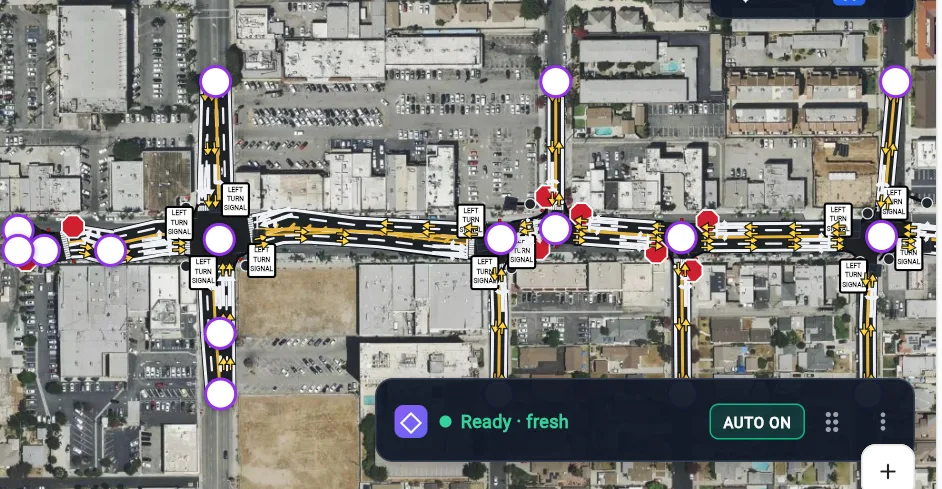
Coding a network by hand is hours of clicking before any analysis starts. AI Build reads the imagery and the map, then lays out every approach — lane counts, turn pockets, medians, crosswalks and traffic control — as an editable model ready for analysis.
Built for the way engineers actually work.
Reads the imagery
Road edges, lane lines and turn arrows are traced from aerial imagery, then checked against map data — the imagery wins when they disagree.
Lanes and pockets per approach
Each approach is read on its own: through lanes, dual lefts, right-turn bays and storage lengths, with a turn lane added only where the evidence agrees.
Control included
Signals, stop signs and roundabouts are placed with the network, so capacity analysis can run straight away.
Yours to edit
Fix a traced line by hand, by chat, or by boxing a mistake for the agent to redo. Edits stay with the project.
3 steps. One map.
- 01
Select an area
Drag a box over a corridor, an intersection or a whole study area.
- 02
AI Build runs
Imagery and map data become lanes, pockets, medians, driveways and control.
- 03
Review over the imagery
Compare the built network with the satellite view and adjust anything that needs it.
Deliverables
- Lane-level network with turn pockets
- Signals, stop control and roundabouts
- Driveways and median openings
- Network ready for HCM and simulation
Exports to Word, PDF and images. Every value is editable and traceable to its inputs.
AI Build — network from imagery — questions
How accurate is AI Build?
Does it work outside big cities?
Related modules
Traffic Impact Studies
Scope, analyse and write the full TIA — existing, opening-year and horizon scenarios, mitigation and fair share — with figures and tables ready for submittal.
Learn moreCapacity & LOS (HCM)
HCM signalized, stop-controlled and roundabout analysis on your live network — reads counts and signal timing from any controller printout.
Learn moreTraffic Simulation
Microsimulate the network you built — in 2D or 3D — to see queues, spillback and how mitigation actually performs.
Learn moreSee your own study area in LaneMarker AI Studio.
Bring a corridor or a site you are working on. In 30 minutes we will build the network, run the analysis and show you the report — on your project, not a canned demo.